Matplotlib · Styling
Making plots readable: style sheets, colours, labels with units, annotations, removing chart junk, and saving at the right DPI.
My styling checklist from today:
- Axis labels with units (
"Temperature (°C)"). - A title that states the finding, not just the variable names.
- Remove chart junk: hide the top and right spines, and use light grid lines.
- Annotate the one point that matters with
ax.annotate. - Use perceptually uniform colormaps like
viridisfor continuous data. The Matplotlib docs explain whyjetmisleads. - Save at a sensible DPI and call
bbox_inches="tight".
rcParams and style sheets (plt.style.use(...)) change the defaults everywhere at once.
import os
import numpy as np
import matplotlib.pyplot as plt

plt.rcParams.update({"font.size": 11, "axes.spines.top": False, "axes.spines.right": False})

months = np.arange(1, 13)
temp = np.array([20.1, 22.8, 27.9, 32.4, 35.0, 33.6, 30.2, 29.1, 29.6, 28.4, 25.2, 21.6])  # illustrative values
fig, ax = plt.subplots(figsize=(7, 3.6), dpi=150)
ax.plot(months, temp, marker="o", color="#c2410c")
ax.grid(axis="y", alpha=0.3)
ax.set_xticks(months, ["J", "F", "M", "A", "M", "J", "J", "A", "S", "O", "N", "D"])
ax.set_xlabel("Month")
ax.set_ylabel("Mean temperature (°C)")
ax.set_title("Illustrative data: the warmest month stands out")
peak = temp.argmax()
ax.annotate(f"peak {temp[peak]} °C", xy=(months[peak], temp[peak]),
            xytext=(months[peak] + 1.5, temp[peak] - 1), arrowprops={"arrowstyle": "->"})
fig.savefig(os.environ["SNIPPET_FIG"], bbox_inches="tight")

print("available styles include ggplot:", "ggplot" in plt.style.available)
print("peak month index:", int(months[peak]))
Output:
available styles include ggplot: True
peak month index: 5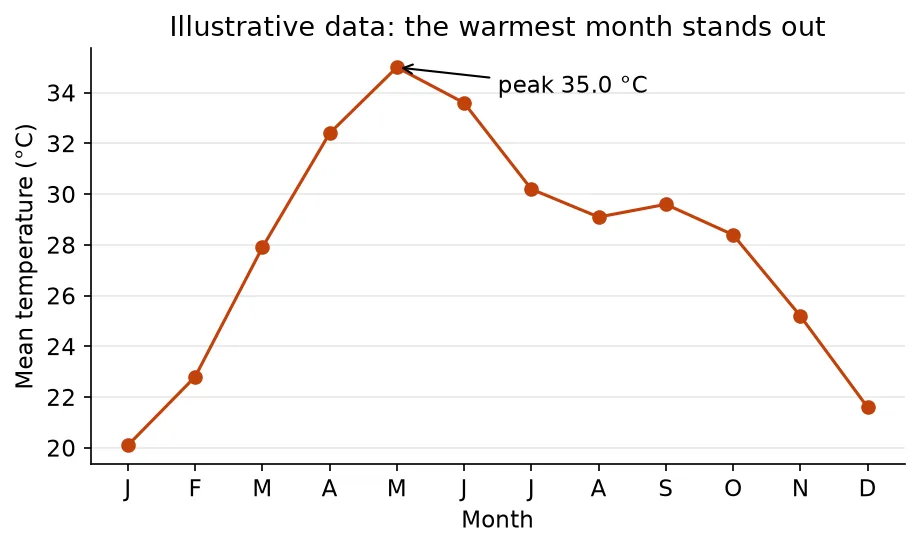
The temperatures here are made-up practice numbers, not real weather data.
Sources
- Customizing Matplotlib with style sheets and rcParams — Matplotlib
- Annotations — Matplotlib
- Choosing Colormaps in Matplotlib — Matplotlib