Computer Vision · Data augmentation
Label-preserving random transforms (flips, crops, rotation, colour jitter) with torchvision.transforms.v2, applied consistently to images and boxes.
Data augmentation applies random, label-preserving transforms during training, so each epoch sees slightly different versions of each image. The model learns that a cat flipped or slightly darker is still a cat.
Common transforms, all in torchvision.transforms.v2:
- geometric: random resized crop, horizontal flip, small rotations
- photometric: colour jitter (brightness, contrast, saturation, hue)
- stronger ones: RandAugment, random erasing, MixUp/CutMix
Two rules:
- Augment only the training set.
- Keep the label valid. Flipping digits or text can change their meaning, and in detection the boxes must move with the image. The v2 transforms handle that when the boxes are wrapped as
tv_tensors.BoundingBoxes.
import os
import torch
import matplotlib.pyplot as plt
from torchvision import tv_tensors
from torchvision.transforms import v2
from sklearn.datasets import load_sample_image

torch.manual_seed(0)
img = tv_tensors.Image(torch.from_numpy(load_sample_image("flower.jpg")).permute(2, 0, 1))
boxes = tv_tensors.BoundingBoxes([[150, 100, 450, 380]], format="XYXY", canvas_size=img.shape[-2:])

aug = v2.Compose([
    v2.RandomResizedCrop(size=(256, 256), scale=(0.5, 1.0), antialias=True),
    v2.RandomHorizontalFlip(p=0.5),
    v2.RandomRotation(degrees=15),
    v2.ColorJitter(brightness=0.4, contrast=0.4, saturation=0.4, hue=0.05),
])
fig, axs = plt.subplots(1, 5, figsize=(14, 3), dpi=130)
axs[0].imshow(img.permute(1, 2, 0)); axs[0].set_title("original"); axs[0].axis("off")
x1, y1, x2, y2 = boxes[0].tolist()
axs[0].add_patch(plt.Rectangle((x1, y1), x2 - x1, y2 - y1, fill=False, color="orange", lw=2))
for k in range(1, 5):
    out_img, out_box = aug(img, boxes)
    axs[k].imshow(out_img.permute(1, 2, 0)); axs[k].axis("off"); axs[k].set_title(f"augmented {k}")
    if len(out_box):
        bx1, by1, bx2, by2 = out_box[0].tolist()
        axs[k].add_patch(plt.Rectangle((bx1, by1), bx2 - bx1, by2 - by1, fill=False, color="orange", lw=2))
    print(f"view {k}: image {tuple(out_img.shape)}, box {[round(v) for v in out_box[0].tolist()] if len(out_box) else 'cropped out'}")
fig.tight_layout(); fig.savefig(os.environ["SNIPPET_FIG"])
Output:
view 1: image (3, 256, 256), box [33, 54, 201, 236]
view 2: image (3, 256, 256), box [0, 38, 186, 235]
view 3: image (3, 256, 256), box [23, 50, 240, 244]
view 4: image (3, 256, 256), box [20, 50, 229, 255]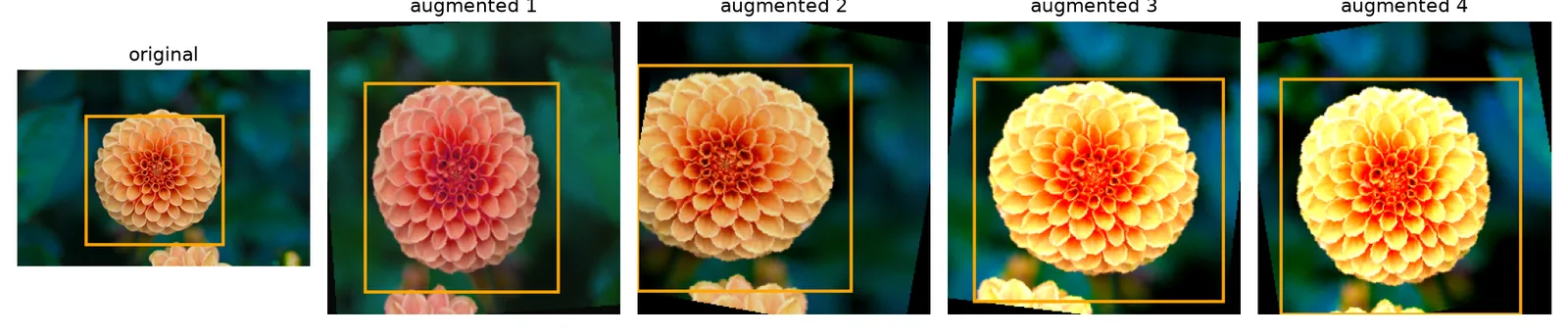
That completes computer vision. Next phase: Transformers, starting with “Attention Is All You Need”.